
1. 사전 준비사항
- MVVM 구조에 대한 이해
2026.04.23 - [C#/Study] - WPF : MVVM(Model - View - ViewModel)
WPF : MVVM(Model - View - ViewModel)
1. MVVM [View (XAML)] ↓ Binding[ViewModel] ↓ 데이터 처리[Model]2. Model(Data)데이터UI 를 알 필요없음로직 Xpublic class Car{ public string Name { get; set; } public int Speed { get; set; }}3. ViewModel 1) 역할UI에 보여줄 데이터
marin0806.tistory.com
- DispatcherTimer Class(타이머 클래스)
※ DispatcherTimer
- UI 스레드에서 Tick 이벤트를 실행하는 타이머
private DispatcherTimer _timer;
1. Interval(TimeSpan Type)
_timer.Interval = TimeSpan.FromSeconds(1);> 1초마다 Tick 이벤트를 발생시키겠다.
2. Tick
void Timer_Tick(object sender, EventArgs e)
{
    // Logic
}

_timer.Tick += Timer_Tick;
> Interval 마다 실행되는 이벤트(메서드)
3. Start
_timer.Start();> 타이머 시작
4. Stop
_timer.Stop();> 타이머 멈춤
5. IsEnabled
_timer.IsEnabled
// true or false 반환
> 현재 실행 상태 확인(true/false)
2. Solution(솔루션 구조)
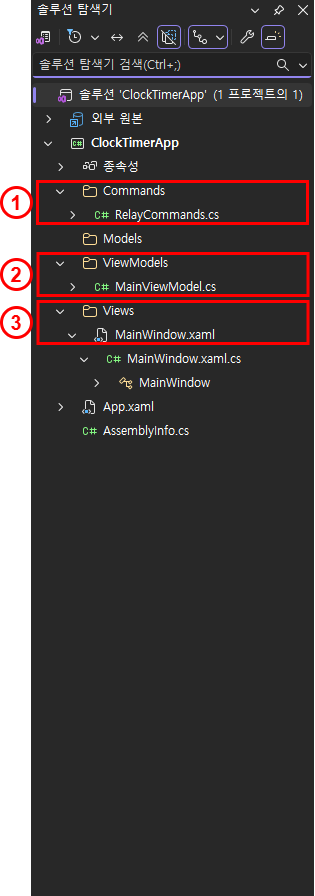
① Commands : Commands\RelayCommands.cs
② ViewModels : ViewModels\MainViewModels.cs
③ Views : Views\MainWindow.xaml(MainWindow.xaml.cs)
3. RelayCommands 구현
using System;
using System.Windows.Input;


public class RelayCommand : ICommand
{
    private readonly Action _execute;
    private readonly Func<bool> _canExecute;
    public RelayCommand(Action execute, Func<bool> canExecute = null)
    {
        _execute = execute;
        _canExecute = canExecute;
    }
    public bool CanExecute(object parameter) => _canExecute?.Invoke() ?? true;
    public void Execute(object parameter) => _execute();

    public event EventHandler CanExecuteChanged;

    public void RaiseCanExecuteChanged() => CanExecuteChanged?.Invoke(this, EventArgs.Empty);
}
> 이전 글과 구조는 같다.
4. MainViewModel 구현
1) 전체구현
using System;
using System.ComponentModel;
using System.Windows.Threading;
using System.Windows.Input;
using Microsoft.VisualBasic;

public class MainViewModel : INotifyPropertyChanged
{
    private DispatcherTimer _timer;

    private string _currentTime;
    public string CurrentTime
    {
        get => _currentTime;
        set
        {
            _currentTime = value;
            OnPropertyChanged(nameof(CurrentTime));
        }
    }

    private TimeSpan _stopwatchTime;
    public string StopwatchTime => _stopwatchTime.ToString(@"hh\:mm\:ss");

    private bool _isRunning;

    public ICommand StartCommand { get; }
    public ICommand StopCommand { get; }
    public ICommand ResetCommand { get; }

    public MainViewModel()
    {
        _timer = new DispatcherTimer();
        _timer.Interval = TimeSpan.FromSeconds(1);
        _timer.Tick += Timer_Tick;
        _timer.Start();

        StartCommand = new RelayCommand(Start);
        StopCommand = new RelayCommand(Stop);
        ResetCommand = new RelayCommand(Reset);
    }

    private void Timer_Tick(object sender, EventArgs e)
    {
        CurrentTime = DateTime.Now.ToString("HH:mm:ss");

        if (_isRunning)
        {
            _stopwatchTime = _stopwatchTime.Add(TimeSpan.FromSeconds(1));
            OnPropertyChanged(nameof(StopwatchTime));
        }
    }

    private void Start()
    {
        _isRunning = true;
    }
    private void Stop()
    {
        _isRunning = false;
    }
    private void Reset()
    {
        _isRunning = false;
        _stopwatchTime = TimeSpan.Zero;
        OnPropertyChanged(nameof(StopwatchTime));
    }

    public event PropertyChangedEventHandler PropertyChanged;
    private void OnPropertyChanged(string propertyName)
    {
        PropertyChanged?.Invoke(this, new PropertyChangedEventArgs(propertyName));
    }
}
2) 설명
1. Data Binding
public string CurrentTime
{
    get => _currentTime;
    set
    {
        _currentTime = value;
        OnPropertyChanged(nameof(CurrentTime));
    }
}

public string StopwatchTime => _stopwatchTime.ToString(@"hh\:mm\:ss");
> 바인딩 될 데이터들
2. Command Binding
public ICommand StartCommand { get; }
public ICommand StopCommand { get; }
public ICommand ResetCommand { get; }
> 바인딩 될 명령들
3. Command Mathod
private void Start()
{
    _isRunning = true;
}
private void Stop()
{
    _isRunning = false;
}
private void Reset()
{
    _isRunning = false;
    _stopwatchTime = TimeSpan.Zero;
    OnPropertyChanged(nameof(StopwatchTime));
}
> 바인딩 된 명령들(Command)의 Execute로 호출될 메서드들
4. MainViewModel 생성자
public MainViewModel()
{
    _timer = new DispatcherTimer();
    _timer.Interval = TimeSpan.FromSeconds(1);
    _timer.Tick += Timer_Tick;
    _timer.Start();

    StartCommand = new RelayCommand(Start);
    StopCommand = new RelayCommand(Stop);
    ResetCommand = new RelayCommand(Reset);
}
> Command 들을 RelayCommand 형 객체로 동적생성
5. PropertyChangedEventHandler
public event PropertyChangedEventHandler PropertyChanged;
private void OnPropertyChanged(string propertyName)
{
    PropertyChanged?.Invoke(this, new PropertyChangedEventArgs(propertyName));
}
> 데이터 변경에 따라 View 에게 알림을 주기위한 PropertyChangeEventHandler
5. MainWindow.xaml 구현
1) 전체구현
<Window x:Class="ClockTimerApp.MainWindow"
        xmlns="http://schemas.microsoft.com/winfx/2006/xaml/presentation"
        xmlns:x="http://schemas.microsoft.com/winfx/2006/xaml"
        xmlns:d="http://schemas.microsoft.com/expression/blend/2008"
        xmlns:mc="http://schemas.openxmlformats.org/markup-compatibility/2006"
        xmlns:local="clr-namespace:ClockTimerApp"
        mc:Ignorable="d"
        Title="MainWindow" Height="300" Width="300">

    <StackPanel VerticalAlignment="Center" HorizontalAlignment="Center">
        <TextBlock Text="{Binding CurrentTime}"
                   FontSize="30"
                   HorizontalAlignment="Center"
                   Margin="10"/>
        <TextBlock Text="{Binding StopwatchTime}"
                   FontSize="25"
                   HorizontalAlignment="Center"
                   Margin="10"/>

        <StackPanel Orientation="Horizontal" HorizontalAlignment="Center">
            <Button Content="Start" Command="{Binding StartCommand}" Margin="5"/>
            <Button Content="Stop" Command="{Binding StopCommand}" Margin="5"/>
            <Button Content="Reset" Command="{Binding ResetCommand}" Margin="5"/>
        </StackPanel>
    </StackPanel>

</Window>
2) 설명
1. Data Binding
<TextBlock Text="{Binding CurrentTime}"
           FontSize="30"
           HorizontalAlignment="Center"
           Margin="10"/>
<TextBlock Text="{Binding StopwatchTime}"
           FontSize="25"
           HorizontalAlignment="Center"
           Margin="10"/>
> CurrentTime, StopwatchTime 바인딩
2) CommandBinding
<Button Content="Start" Command="{Binding StartCommand}" Margin="5"/>
<Button Content="Stop" Command="{Binding StopCommand}" Margin="5"/>
<Button Content="Reset" Command="{Binding ResetCommand}" Margin="5"/>
> Start, Stop, Reset 바인딩
5.1 View - ViewModel 연결
using System.Windows;

namespace ClockTimerApp
{
    /// <summary>
    /// Interaction logic for MainWindow.xaml
    /// </summary>
    public partial class MainWindow : Window
    {
        public MainWindow()
        {
            InitializeComponent();
            DataContext = new MainViewModel();
        }
    }
}
DataContext = new MainViewModel();> View 는 MainViewModel 이라는 ViewModel 과 연결됨.
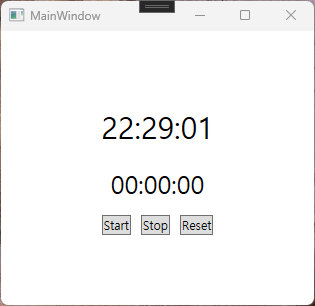
6. 구현 ScreenShot
7. 구현 Video
'FRAMEWORK > WPF' 카테고리의 다른 글
| WPF : ViewModel - DI(의존성 주입) (0) | 2026.04.25 |
|---|---|
| WPF : Model (0) | 2026.04.25 |
| WPF : MVVM(Model - View - ViewModel) (0) | 2026.04.23 |
| WPF : WPF 에 대하여 (0) | 2026.04.22 |