C# 네트워크
1. 소켓이란 소스코드로 구현한 논리적 추상화 형태임.
C언어 기반 POSIX, BSD, <sys/socket.h>
2. 다른 언어에서 사용시에는 더 편리한 사용을 위해 소켓 API를 래핑(wrapping)한 라이브러리를 사용하는 것.
3. API : 운영체제와 응용 프로그램 사이의 통신에 사용되는 언어나 메시지
4. C# Socket : WinSock2 API를 래핑한 버전
4.1 TcpClient, TcpListner, UdpClient : 내부적으로 Socket 사용
5. IPAddress : 해당 클래스의 객체를 생성하여 생성자 및 메서드를 이용해(ipv4, ipv6의 IP 주소를 얻는다)
5.1 IPEndPoint : IP와 포트번호를 결합하여 얻을 수 있는 클래스
C# Socket

C# Socket 동기
※ 프로젝트 생성시 템플릿에서 .NET Framwork는 구버전을 뜻함(윈도우 전용)
0. 유용한 기능
F5 -> 디버깅 시작
F9 -> 중단점 설정(디버깅 후 여기까지만 진행됨)
F10 -> 한줄씩 실행
1. Server
1) Accept 블로킹 체험하기
using System;
using System.Net;
using System.Net.Sockets;
using System.Text;

namespace SocketTest01
{
    internal class Program
    {
        static void Main(string[] args)
        {
            // (1)
            Socket servSocket = new Socket(AddressFamily.InterNetwork, SocketType.Stream, ProtocolType.Tcp);

            // (2)
            IPAddress ipaddr = IPAddress.Any;
            IPEndPoint ipep = new IPEndPoint(ipaddr, 23000);
            servSocket.Bind(ipep);

            // (3)
            servSocket.Listen(5);
            Console.WriteLine("Server listening on: " + servSocket.LocalEndPoint?.ToString());
            Console.WriteLine("Waiting for incoming connection...");

            // (4)
            servSocket.Accept(); // 블로킹
        }
    }
}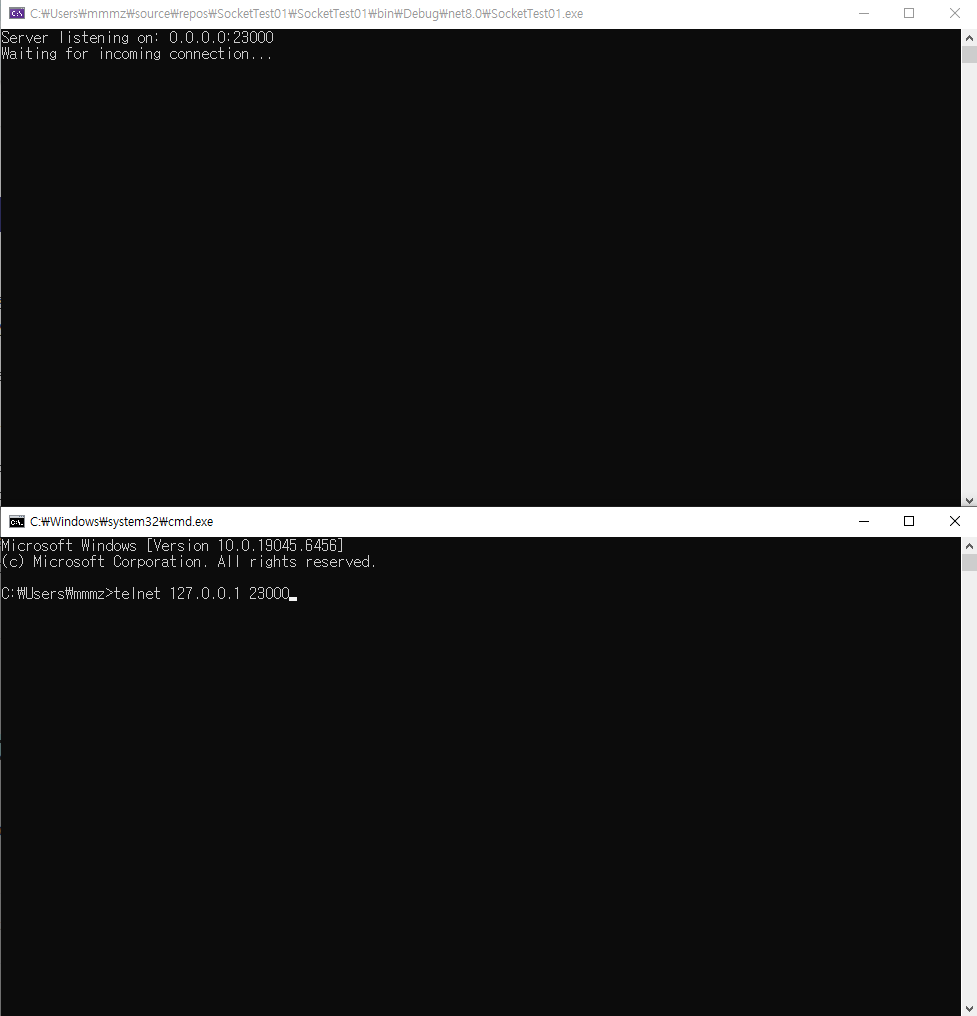
▲ cmd 창으로

▲ 실행창으로 하기
2) 에코 해보기(cmd, 모바일)
using System;
using System.Net;
using System.Net.Sockets;
using System.Text;

namespace SocketTest01
{
    internal class Program
    {
        static void Main(string[] args)
        {
            // (1)
            Socket servSocket = new Socket(AddressFamily.InterNetwork, SocketType.Stream, ProtocolType.Tcp);

            // (2)
            IPAddress ipaddr = IPAddress.Any;
            IPEndPoint ipep = new IPEndPoint(ipaddr, 23000);
            servSocket.Bind(ipep);

            // (3)
            servSocket.Listen(5);
            Console.WriteLine("Server listening on: " + servSocket.LocalEndPoint?.ToString());
            Console.WriteLine("Waiting for incoming connection...");

            // (4)
            Socket connSocket = servSocket.Accept(); // 블로킹
            Console.WriteLine("Client connected. " + connSocket.ToString() + " - IP End Point: " + connSocket.RemoteEndPoint?.ToString());

            byte[] buff = new byte[128];
            int numberOfReceivedBytes = 0;

            while (true)
            {
                // (5)
                numberOfReceivedBytes = connSocket.Receive(buff);

                Console.WriteLine("Number of received bytes: " + numberOfReceivedBytes);

                Console.WriteLine("Data sent by client is: " + buff);

                string receivedText = Encoding.ASCII.GetString(buff, 0, numberOfReceivedBytes);

                Console.WriteLine("Data sent by client is: " + receivedText);

                // (6)
                connSocket.Send(buff);

                if (receivedText == "x")
                {
                    break;
                }

                Array.Clear(buff, 0, buff.Length);
                numberOfReceivedBytes = 0;
            }
        }
    }
}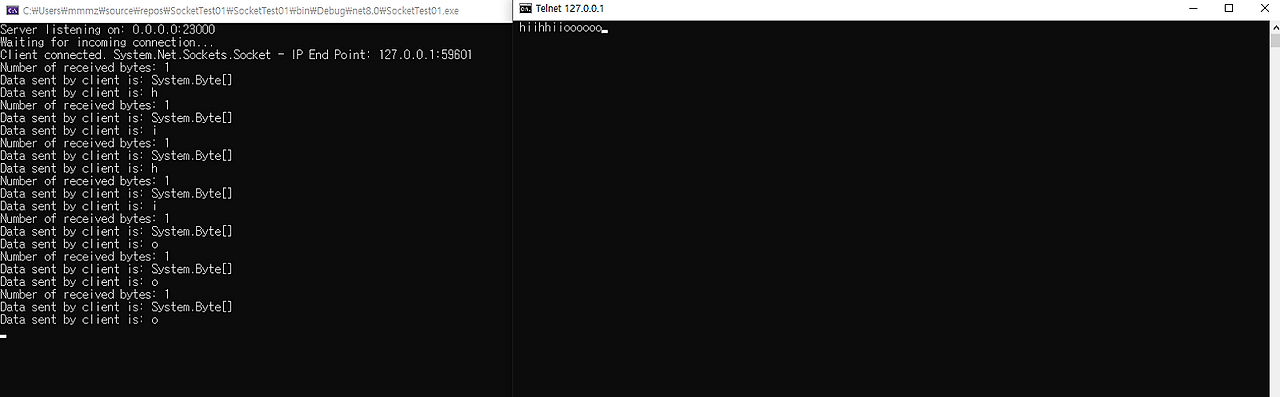
▲ cmd 창으로
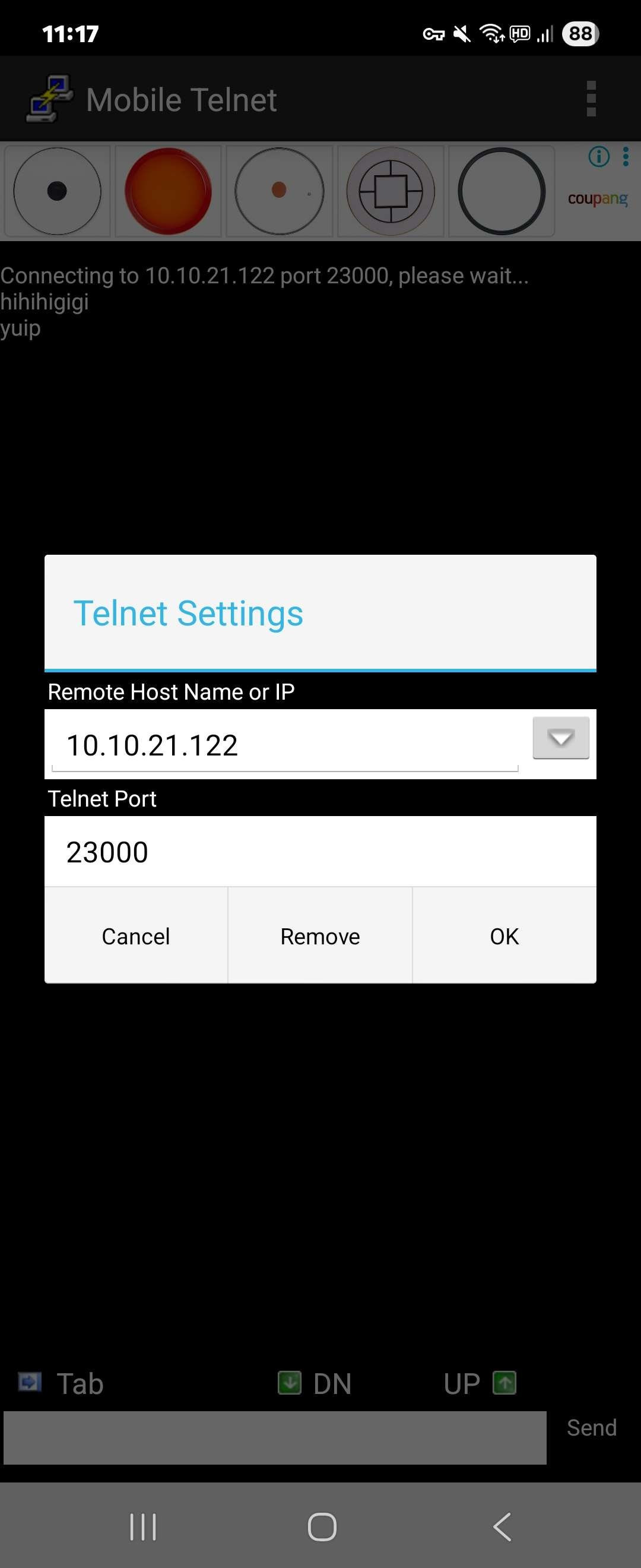
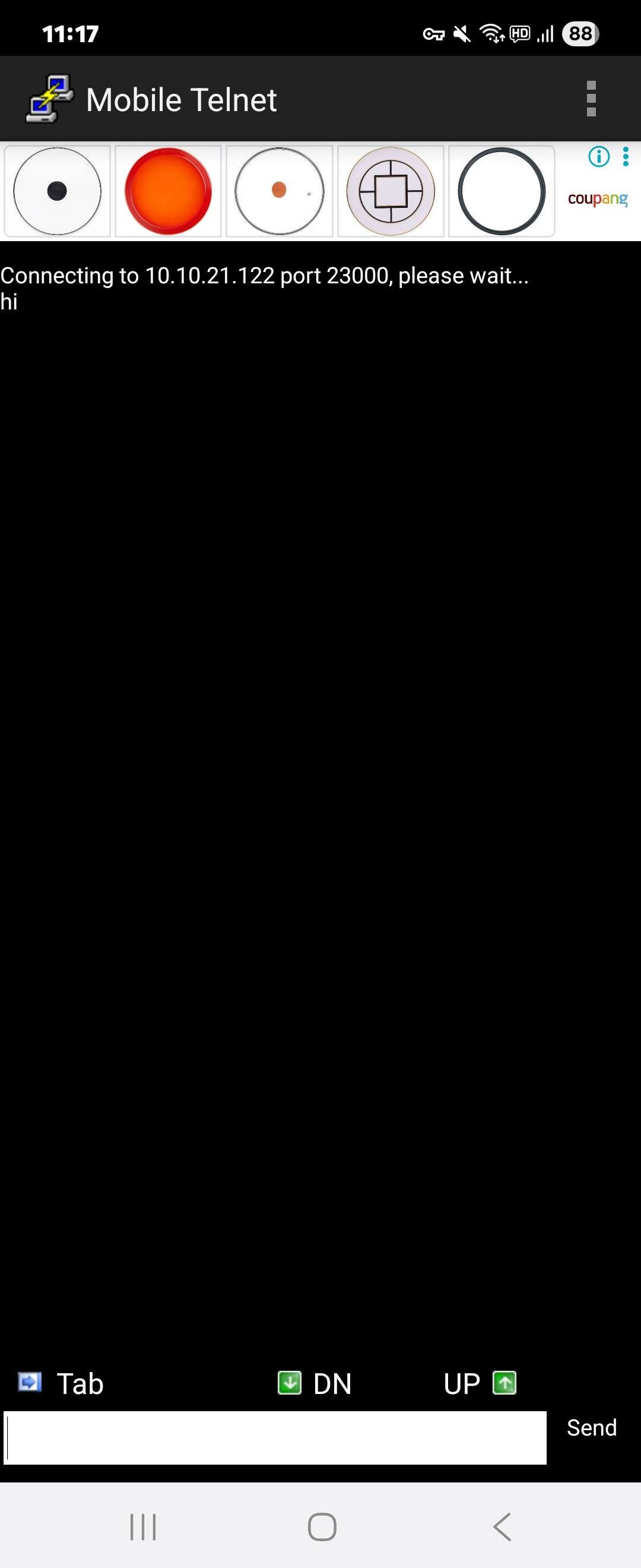

▲ 모바일로 에코(방화벽 해제 필요)
2. Client
0) 유용한 기능(단축키)
블록 씌우기 : 드래그 후 ctrl+k -> ctrl+s
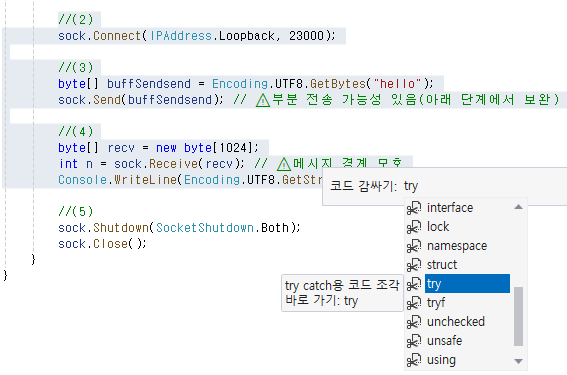
1) 예외 처리하기(try - catch)
using System;
using System.Net;
using System.Net.Sockets;
using System.Text;

class Step0_Minimal
{
    static void Main()
    {
        //(1)
        Socket sock = new Socket(AddressFamily.InterNetwork, SocketType.Stream, ProtocolType.Tcp);

        //(2)
        sock.Connect(IPAddress.Loopback, 23000);

        //(3)
        byte[] buffSendsend = Encoding.UTF8.GetBytes("hello");
        sock.Send(buffSendsend); // ⚠️부분 전송 가능성 있음(아래 단계에서 보완)

        //(4)
        byte[] recv = new byte[1024];
        int n = sock.Receive(recv); // ⚠️메시지 경계 모호
        Console.WriteLine(Encoding.UTF8.GetString(recv, 0, n));

        //(5)
        sock.Shutdown(SocketShutdown.Both);
        sock.Close();
    }
}
▲ 예외 발생(예외 처리가 안됨)
using System;
using System.Net;
using System.Net.Sockets;
using System.Text;

class Step0_Minimal
{
    static void Main()
    {
        //(1)
        Socket sock = new Socket(AddressFamily.InterNetwork, SocketType.Stream, ProtocolType.Tcp);

        try
        {
            //(2)
            sock.Connect(IPAddress.Loopback, 23000);

            //(3)
            byte[] buffSendsend = Encoding.UTF8.GetBytes("hello");
            sock.Send(buffSendsend); // ⚠️부분 전송 가능성 있음(아래 단계에서 보완)

            //(4)
            byte[] recv = new byte[1024];
            int n = sock.Receive(recv); // ⚠️메시지 경계 모호
            Console.WriteLine(Encoding.UTF8.GetString(recv, 0, n));
        }
        // + 수정 Step 1.
        catch (SocketException se) when (se.SocketErrorCode == SocketError.ConnectionRefused)
        {
            Console.WriteLine("⚠️ 연결 거절: 해당 주소/포트에서 서버가 수신 중이 아닙니다.");
            Console.WriteLine("- 서버가 실행 중인지 확인");
        }
        catch (SocketException se)
        {
            Console.WriteLine($"소켓 예외: {se.SocketErrorCode} - {se.Message}");
        }
        catch (Exception ex)
        {
            Console.WriteLine($"예상치 못한 오류: {ex}");
        }
        finally
        {
            //(5)
            if (sock != null)
            {
                if (sock.Connected)
                    sock.Shutdown(SocketShutdown.Both);

                sock.Dispose();// Close() 생략 가능 (Dispose가 Close 포함)
            }

            //string stop = Console.ReadLine();
        }
    }
}
▲ 예외 처리됨
3. SERVER - CLIENT / SOCKET / 동기 연결
▼ SERVER(SocketTest01.cs)
using System;
using System.Net;
using System.Net.Sockets;
using System.Text;

namespace SocketTest01
{
    internal class Program
    {
        static void Main(string[] args)
        {
            // (1)
            Socket servSocket = new Socket(AddressFamily.InterNetwork, SocketType.Stream, ProtocolType.Tcp);

            // (2)
            IPAddress ipaddr = IPAddress.Any;
            IPEndPoint ipep = new IPEndPoint(ipaddr, 23000);
            servSocket.Bind(ipep);

            // (3)
            servSocket.Listen(5);
            Console.WriteLine("Server listening on: " + servSocket.LocalEndPoint?.ToString());
            Console.WriteLine("Waiting for incoming connection...");

            // (4)
            Socket connSocket = servSocket.Accept(); // 블로킹
            Console.WriteLine("Client connected. " + connSocket.ToString() + " - IP End Point: " + connSocket.RemoteEndPoint?.ToString());

            byte[] buff = new byte[128];
            int numberOfReceivedBytes = 0;

            while (true)
            {
                // (5)
                numberOfReceivedBytes = connSocket.Receive(buff);

                Console.WriteLine("Number of received bytes: " + numberOfReceivedBytes);

                Console.WriteLine("Data sent by client is: " + buff);

                string receivedText = Encoding.ASCII.GetString(buff, 0, numberOfReceivedBytes);

                Console.WriteLine("Data sent by client is: " + receivedText);

                // (6)
                connSocket.Send(buff);

                if (receivedText == "x")
                {
                    break;
                }

                Array.Clear(buff, 0, buff.Length);
                numberOfReceivedBytes = 0;
            }
        }
    }
}
▼ CLIENT(SocketClient0.cs)
using System;
using System.Net;
using System.Net.Sockets;
using System.Text;

class Client01
{
    static void Main()
    {
        //(1)
        Socket clientSocket = new Socket(AddressFamily.InterNetwork, SocketType.Stream, ProtocolType.Tcp);

        try
        {
            //(2) + 수정 Step 2.
            IPAddress? ipaddr = null;

            Console.WriteLine("*** 소켓 클라이언트 시작 예제에 오신 것을 환영합니다. ***");
            Console.WriteLine("서버의 IP 주소를 입력하고 Enter 키를 누르세요: ");

            string? strIPAddress = Console.ReadLine();

            Console.WriteLine("유효한 포트 번호(0~65535)를 입력하고 Enter 키를 누르세요: ");
            string? strPortInput = Console.ReadLine();
            int nPortInput = 0;

            if (strIPAddress == " ") strIPAddress = "127.0.0.1";
            if (strPortInput == " ") strPortInput = "23000";

            if (!IPAddress.TryParse(strIPAddress, out ipaddr))
            {
                Console.WriteLine("잘못된 서버 IP가 입력되었습니다.");
                return;
            }
            if (!int.TryParse(strPortInput?.Trim(), out nPortInput))
            {
                Console.WriteLine("잘못된 포트 번호가 입력되었습니다. 프로그램을 종료합니다.");
                return;
            }

            if (nPortInput <= 0 || nPortInput > 65535)
            {
                Console.WriteLine("포트 번호는 0 이상 65535 이하의 값이어야 합니다.");
                return;
            }

            Console.WriteLine($"서버 정보 → IP 주소: {ipaddr} / 포트: {nPortInput}");

            clientSocket.Connect(ipaddr, nPortInput);

            Console.WriteLine("서버에 연결되었습니다!");

            //(3) + 수정 Step 2.
            Console.WriteLine("텍스트를 입력 후 Enter 키를 누르면 서버로 전송됩니다.");
            Console.WriteLine("프로그램을 종료하려면 <EXIT> 을 입력하세요.");

            string inputCommand = string.Empty;

            while (true)
            {
                inputCommand = Console.ReadLine() ?? string.Empty;

                if (inputCommand.Equals("<EXIT>"))
                {
                    break;
                }

                byte[] buffSend = Encoding.ASCII.GetBytes(inputCommand);

                //(4)
                clientSocket.Send(buffSend);

                byte[] buffReceived = new byte[128];
                int nRecv = clientSocket.Receive(buffReceived);

                Console.WriteLine("서버로부터 수신한 데이터: {0}", Encoding.ASCII.GetString(buffReceived, 0, nRecv));
            }
        }
        // + 수정 Step 1.
        catch (SocketException se) when (se.SocketErrorCode == SocketError.ConnectionRefused)
        {
            Console.WriteLine("⚠️ 연결 거절: 해당 주소/포트에서 서버가 수신 중이 아닙니다.");
            Console.WriteLine("- 서버가 실행 중인지 확인");
        }
        catch (SocketException se)
        {
            Console.WriteLine($"소켓 예외: {se.SocketErrorCode} - {se.Message}");
        }
        catch (Exception ex)
        {
            Console.WriteLine($"예상치 못한 오류: {ex}");
        }
        finally
        {
            //(5)
            if (clientSocket != null)
            {
                if (clientSocket.Connected)
                    clientSocket.Shutdown(SocketShutdown.Both);

                clientSocket.Dispose();// Close() 생략 가능 (Dispose가 Close 포함)
            }

            //string stop = Console.ReadLine();
        }

        Console.WriteLine("아무 키나 누르면 프로그램이 종료됩니다...");
        Console.ReadKey();
    }
}
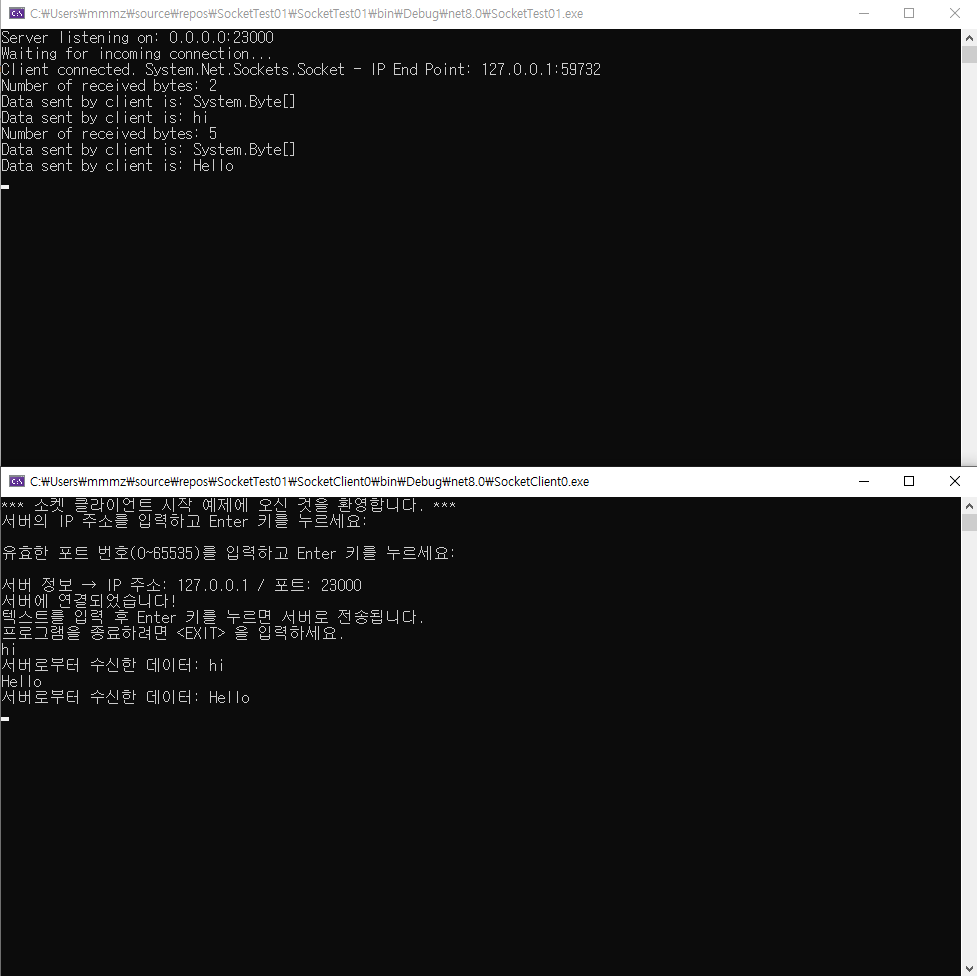
▼ 결과
C# Socket 비동기
0. 유용한 기능
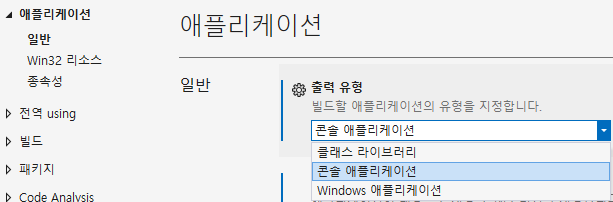
▲ 여기를 콘솔 애플리케이션으로 변경하면, 윈폼과 콘솔(터미널)이 동시에 출력되어 디버깅이 쉬워진다.
1. 동기화 된 코드(Winform)
<SocketTest02 - Sync>
using System;
using System.Net;
using System.Net.Sockets;
using System.Windows.Forms;

namespace SocketTest02___Sync
{
    public partial class Form1 : Form
    {
        public Form1()
        {
            InitializeComponent();
        }

        public void AcceptIncomingSocket()
        {
            // (1) 서버 소켓 생성
            Socket listenerSocket = new Socket(
                AddressFamily.InterNetwork, SocketType.Stream, ProtocolType.Tcp);

            // IP 및 포트 설정
            IPAddress ipaddr = IPAddress.Any;
            IPEndPoint ipep = new IPEndPoint(ipaddr, 23000);

            // (2) 소켓 바인딩
            listenerSocket.Bind(ipep);

            // (3) 연결 요청 대기 상태로 전환
            listenerSocket.Listen(5);
            Console.WriteLine("클라이언트 연결을 대기 중입니다...");
            //Debug.WriteLine("클라이언트 연결을 대기 중입니다...");

            // (4) 클라이언트 연결 수락
            Socket client = listenerSocket.Accept();
            Console.WriteLine(
                $"클라이언트가 연결되었습니다: {client.RemoteEndPoint}"); // 블로킹 됨
        }

        private void btnAsyncSocket(object sender, EventArgs e)
        {
            AcceptIncomingSocket();
        }
    }
}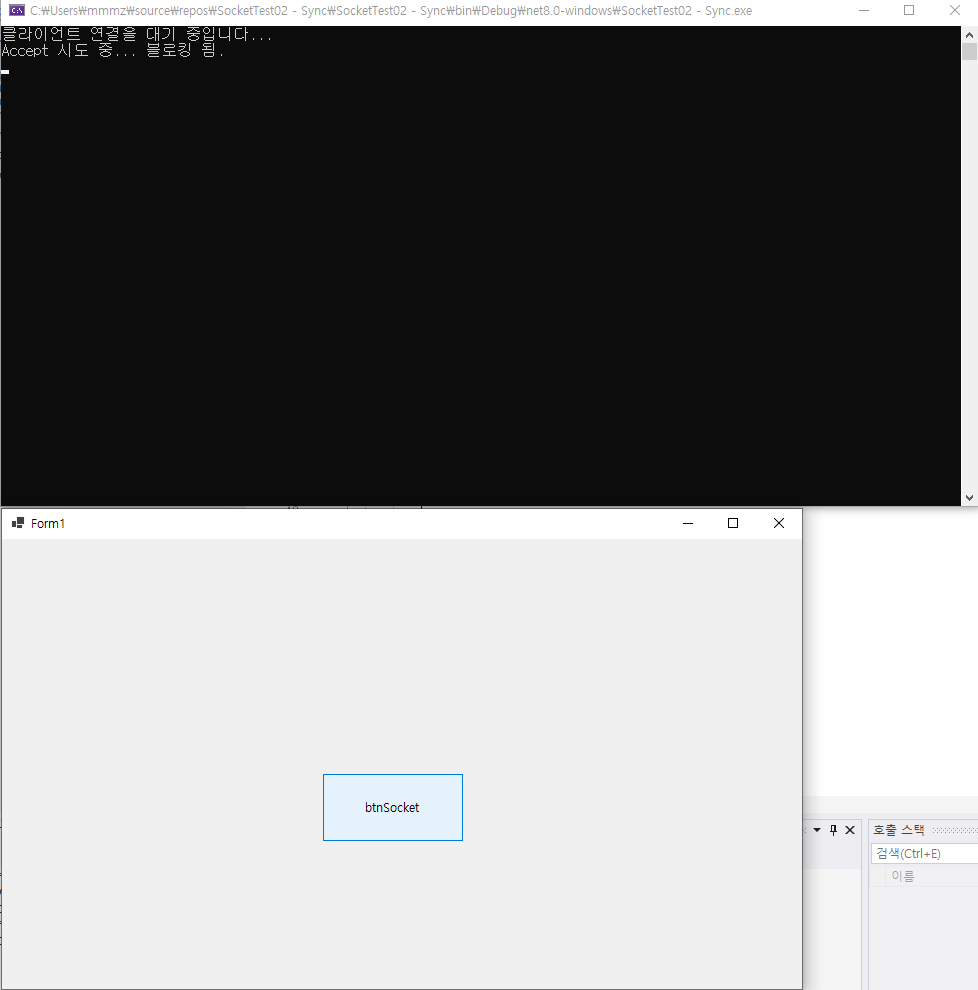
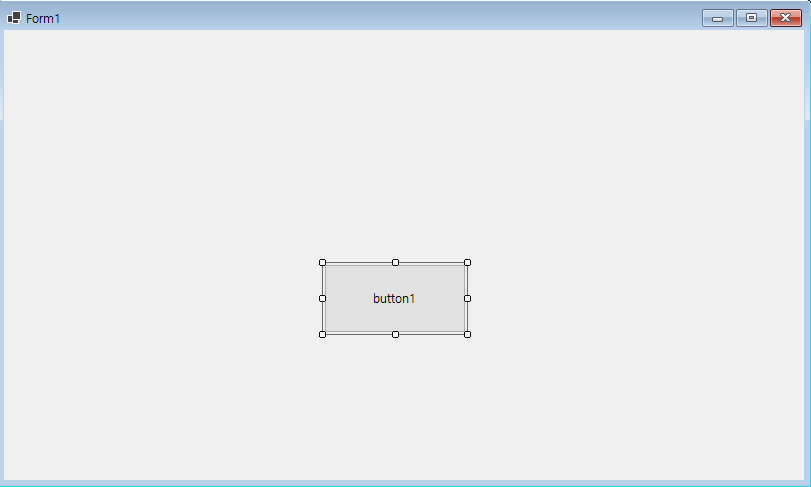
▲ 버튼 클릭 후 AcceptIncomingSocket()가 실행되면서 UI가 멈춤
2. 비동기화로 변경된 코드(Winform / Server)
using System;
using System.Net;
using System.Net.Sockets;
using System.Threading.Tasks;
using System.Windows.Forms;

namespace SocketTest03___Async
{
    public partial class Form1 : Form
    {
        public Form1()
        {
            InitializeComponent();
        }
        public async Task AcceptIncomingSocket()
        {
            // (1) 서버 소켓 생성
            Socket listenerSocket = new Socket(AddressFamily.InterNetwork, SocketType.Stream, ProtocolType.Tcp);

            // IP 및 포트 설정
            IPAddress ipaddr = IPAddress.Any;
            IPEndPoint ipep = new IPEndPoint(ipaddr, 23000);

            // (2) 소켓 바인딩
            listenerSocket.Bind(ipep);

            // (3) 연결 요청 대기 상태로 전환
            listenerSocket.Listen(5);
            Console.WriteLine("클라이언트 연결을 대기 중입니다...");

            // (4) 클라이언트 연결 수락
            Socket listenerSocket1 = listenerSocket;
            Console.WriteLine("이전 블로킹 지점");
            Socket client = await listenerSocket1.AcceptAsync();
            Console.WriteLine($"클라이언트가 연결되었습니다: {client.RemoteEndPoint}");
        }
        private async void BtnListenAsync_Click(object sender, EventArgs e)
        {
            await AcceptIncomingSocket();
        }
    }
}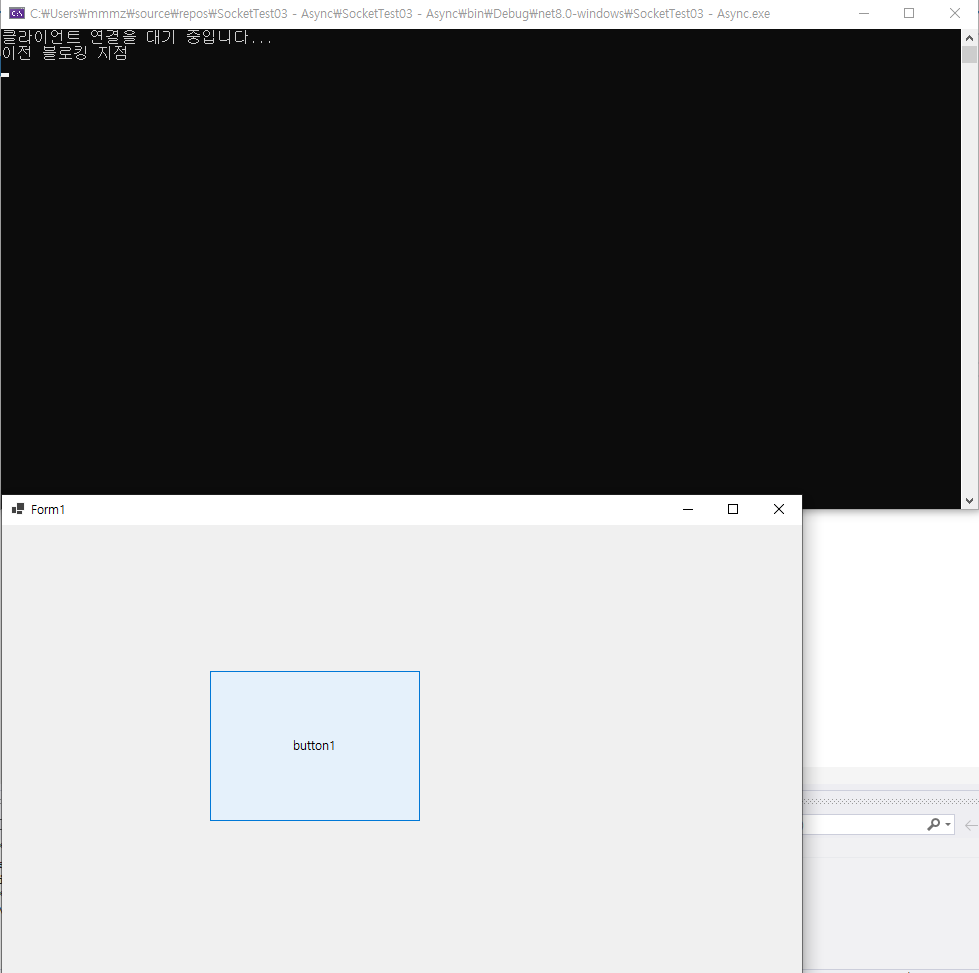
▲ 블로킹 지점이어도 UI는 움직이는 모습
C# TcpClient, TcpListener

C# TcpClient, TcpListener 비동기
<TcpSocketServer.cs> - 라이브러리
using System;
using System.Collections.Generic;
using System.Diagnostics;
using System.IO;
using System.Net;
using System.Net.Sockets;
using System.Text;
using System.Threading.Tasks;

namespace TcpSocket
{
    public class TcpSocketServer
    {
        IPAddress? mIP;
        int mPort;
        TcpListener? mTCPListener;

        List<TcpClient> mClients;

        public TcpSocketServer()
        {
            mClients = new List<TcpClient>();
        }

        public bool KeepRuning { get; set; } = false;

        public async Task StartServerListeningAsync(IPAddress? ipaddr = null, int port = 23000)
        {
            if (ipaddr == null)
                ipaddr = IPAddress.Loopback; // Default to localhost

            if (port <= 0 || mPort > 65535)
                port = 23000; // Default port

            mIP = ipaddr;
            mPort = port;

            //(1)
            mTCPListener = new TcpListener(mIP, mPort);

            try
            {
                //(2)
                mTCPListener.Start();
                Console.WriteLine($"Server started on {mIP.ToString()}:{mPort}");

                KeepRuning = true;

                while (KeepRuning)
                {
                    //(3)
                    TcpClient client = await mTCPListener.AcceptTcpClientAsync();
                    Console.WriteLine("Client connected.");

                    mClients.Add(client);
                    Console.WriteLine(
                        string.Format("클라이언트 연결(총 연결 수: {0}) - 주소: {1}",
                        mClients.Count, client.Client.RemoteEndPoint)
                        );

                    _ = ManageClient(client);
                }
            }
            catch (Exception)
            {

                throw;
            }
        }

        private async void ManageClient(TcpClient client)
        {
            NetworkStream? stream = null;
            StreamReader? reader = null;

            try
            {
                stream = client.GetStream();
                reader = new StreamReader(stream);

                char[] buffer = new char[1024];

                while (KeepRuning)
                {
                    int bytesRead = await reader.ReadAsync(buffer, 0, buffer.Length);
                    if (bytesRead == 0)
                    {
                        RemoveClient(client);
                        Console.WriteLine("클라이언트 연결 종료");
                        break;
                    }
                    string receivedData = new string(buffer, 0, bytesRead);
                    Console.WriteLine($"Received: {receivedData}");

                    _ = SendToAll(receivedData);
                }
            }
            catch (Exception ex)
            {
                Console.WriteLine($"클라이언트 처리 중 오류 발생: {ex.Message}");
                mClients.Remove(client);
            }
        }

        private void RemoveClient(TcpClient client)
        {
            if (mClients.Contains(client))
            {
                mClients.Remove(client);
                Debug.WriteLine(
                    string.Format("클라이언트 연결 종료(총 연결 수: {0}", mClients.Count));
            }
        }

        public async Task SendToAll(string Msg)
        {
            if (string.IsNullOrEmpty(Msg)) return;

            try
            {
                byte[] buffMessage = Encoding.ASCII.GetBytes(Msg);

                foreach(TcpClient clnt in mClients)
                {
                    await clnt.GetStream().WriteAsync(buffMessage, 0, buffMessage.Length);
                }
            }
            catch (Exception excp)
            {
                Debug.WriteLine(excp.ToString());
            }
        }
    }
}
<TcpListener_TcpClient01 - Form1.cs>
using System;
using System.Windows.Forms;
using TcpSocket;

namespace TcpListener_TcpClient01
{
    public partial class Form1 : Form
    {
        TcpSocketServer mServer;
        public Form1()
        {
            InitializeComponent();
            mServer = new TcpSocketServer();
        }

        private async void BtnAcceptIncomingAsync_Click(object sender, EventArgs e)
        {
            await mServer.StartServerListeningAsync();
        }
    }
}
1. async Task StartServerListeningAsync()
>
async 메서드
비동기적으로 실행되며 UI를 정지시키지 않음
2. async Task AcceptTcpClientAsync()
>
async 메서드
클라이언트의 연결 수락을 비동기적으로 받음
3. async void ManageClient
3.1 async Task SendToAll
> 모두 async 메서드이지만 void와 Task의 차이가 있다.
1) void
void는 await으로 호출할 수 없다
2) Task
Task는 await으로 호출할 수 있다
※ 주의 : 여기서 await MangeClient(client)처럼 호출이 불가능하다는 것이지, 자신의 블록의 await 호출이 불가능하다는 것이 아니다. 기본적으로 async 키워드가 붙은 메서드는 내부 블록에 await이 항상 따라 붙는다.
비동기 메서드 호출의 여러가지 형태
1. await
> 가장 전형적인 방법이라고 할 수 있다.
1) 호출
public void first()
{
    two()
}

public async Task two()
{
    ~ 앞 로직 ~
    await three(); // 호출
    ~ 뒤 로직 ~
}

public async Task three()
{
    ~
}
▲ 호출이 되면 두 가지 일이 일어난다.
첫번째로 제어권을 현재 await을 가진 본 메서드(여기서 two)를 호출한 곳(first)으로 넘긴다.(이 것 때문에 비동기라고 불리는 것임)
두번째로는 await 과 함께 호출된 메서드(three)가 끝날 때까지 기다리고, 모두 완료되면 뒤의 로직을 실행한다.
2) 특징
> 위에서 언급한 것처럼 Task 키워드가 붙은 메서드만이 가능함
> 특징은 try catch 문으로 예외를 잡을 수 있다는 점
2. _ = YourMethodAsync()
public void first()
{
    two()
}

public async Task two()
{
    ~ 앞 로직 ~
    _ = three(); // 호출
    ~ 뒤 로직 ~
}

public async Task three()
{
    ~
}
> await과 달리 호출한 메서드(YourMethodAsync)를 기다리지 않는다.
> 제어권을 넘기고, 뒤 로직도 바로 실행한다.
> 따라서 호출해놓고 방치(fire-and-forget)한다는 점에서 진정한 비동기임
> 예외를 잡을 수 없다.(주의)
3) 그냥 호출(YourMethodAsync)
> 위와 기능이 100% 같다
public void first()
{
    two()
}

public async Task two()
{
    ~ 앞 로직 ~
    three(); // 호출
    ~ 뒤 로직 ~
}

public async Task three()
{
    ~
}
>
위의 ( _ = ) 스타일은 명시적으로 비동기로 돌리는 것을 알 수 있는 반면,
그냥 호출은 일반 메서드를 호출한 것인지 비동기 메서드를 호출한 것인지 모른다는 점에서 차이가 있음.
'LMS 7 > 개발일지' 카테고리의 다른 글
| 25.10.22 개발일지 / (주)그림 (0) | 2025.11.13 |
|---|---|
| 25.10.21 개발일지 (0) | 2025.11.13 |
| 25.10.17 개발일지 / C# 명코파크 (5일차) (0) | 2025.11.13 |
| 25.10.16 개발일지 / C# 명코파크 (4일차) (0) | 2025.11.13 |
| 25.10.15 개발일지 / C# 명코파크 (3일차) (0) | 2025.11.13 |